The Hidden SEO Impact of API Integrations and Custom Add-ons
Modern websites are rarely standalone entities. They rely on complex API integrations for CRM syncs, live inventory feeds, and dynamic content delivery. While these custom add-ons enhance functionality, they often introduce severe, invisible roadblocks for search engine crawlers.
Having engineered and audited technical search architectures since 2012, it is clear that poorly implemented dynamic data is a primary cause of stalled indexation. Here is how complex integrations impact your crawlability and how to resolve them.
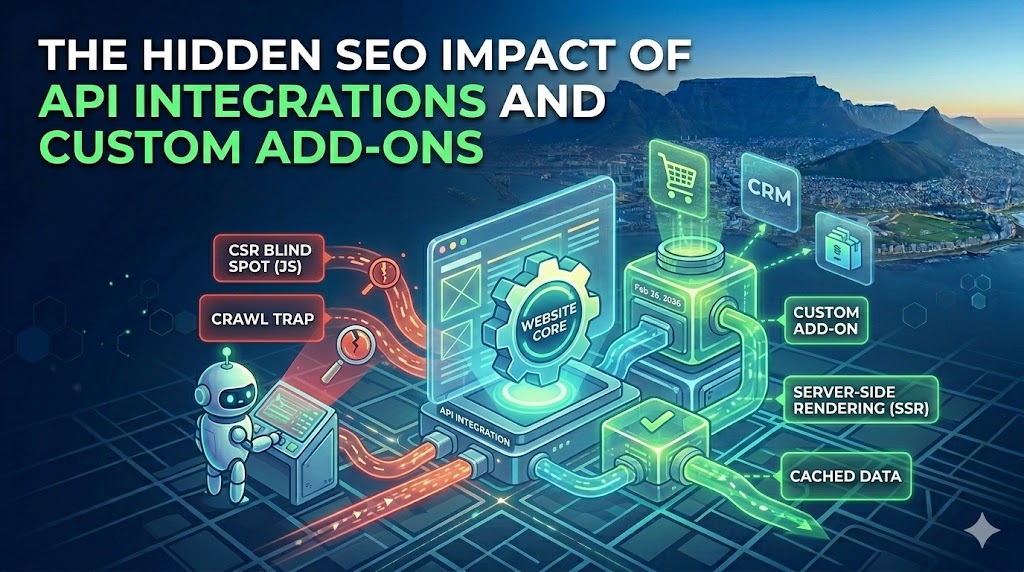
1. Client-Side Rendering (CSR) Blind Spots
Search engines struggle to parse content that requires heavy JavaScript execution. If your API relies entirely on the user’s browser to fetch and display data, Googlebot might never see it.
- The Issue: Content loaded asynchronously via JavaScript (like live pricing or third-party review feeds) often times out before the crawler renders it.
- The Diagnostic: Inspect the page using Google Search Console’s “Test Live URL” tool. Look at the rendered HTML code, not the visual screenshot. If your API-driven content is missing from the raw HTML, it is not being indexed.
- The Technical Fix: Implement Server-Side Rendering (SSR) or dynamic rendering. Ensure your server fetches the API data and compiles it into static HTML before delivering it to the search engine crawler.
2. Crawl Budget Exhaustion via Custom Routing
Custom WordPress add-ons that generate dynamic URLs or parameterized filters frequently trap crawlers in infinite loops.
| Custom Add-on Behavior | SEO Threat Level | Required Architecture Fix |
Dynamic Search Filters (e.g., ?sort=price&brand=x) | Critical | Deploy aggressive robots.txt disallows for query parameters and enforce strict self-referencing canonical tags on parent pages. |
| Uncached External API Calls | High | API latency directly degrades Server Response Time. Implement robust server-side caching (Redis) so Googlebot receives cached data instantly. |
| Orphaned REST API Endpoints | Medium | Secure and restrict /wp-json/ endpoints to prevent crawlers from wasting time indexing raw JSON data instead of frontend pages. |
3. Duplicate Content and Canonical Conflicts
Pulling data from external APIs (such as manufacturer product feeds or syndicated industry news) creates immediate duplicate content issues.
- Syndication Overlap: If your custom add-on automatically publishes content that exists elsewhere on the web, Google will filter your page out of the search results.
- Canonical Enforcement: Any API integration that generates a unique page must programmatically inject a precise canonical tag. If the content is syndicated, the canonical tag must point to the original source URL to protect your site’s overall quality score.
- Schema Injection: Dynamically injected content must also dynamically update the JSON-LD schema. If an API updates a product’s price or availability on the frontend, the
Offerschema must update simultaneously to avoid confusing the crawler.
4. Security Vulnerabilities and Trust Signals
External API integrations open potential security vectors, which directly impact the Trustworthiness pillar of E-E-A-T.
- Mixed Content Warnings: APIs that call assets over HTTP instead of HTTPS will trigger browser security warnings, destroying user trust and algorithmic rankings.
- Third-Party Script Bloat: External scripts often load tracking pixels or unverified code that heavily impacts your Interaction to Next Paint (INP) scores. Always defer or asynchronously load non-critical third-party API scripts.